L-Scan: Under the Hood of a WASM & Morphological Edge-Healed Lego Minifigures Scanner
Hello my dear friends.
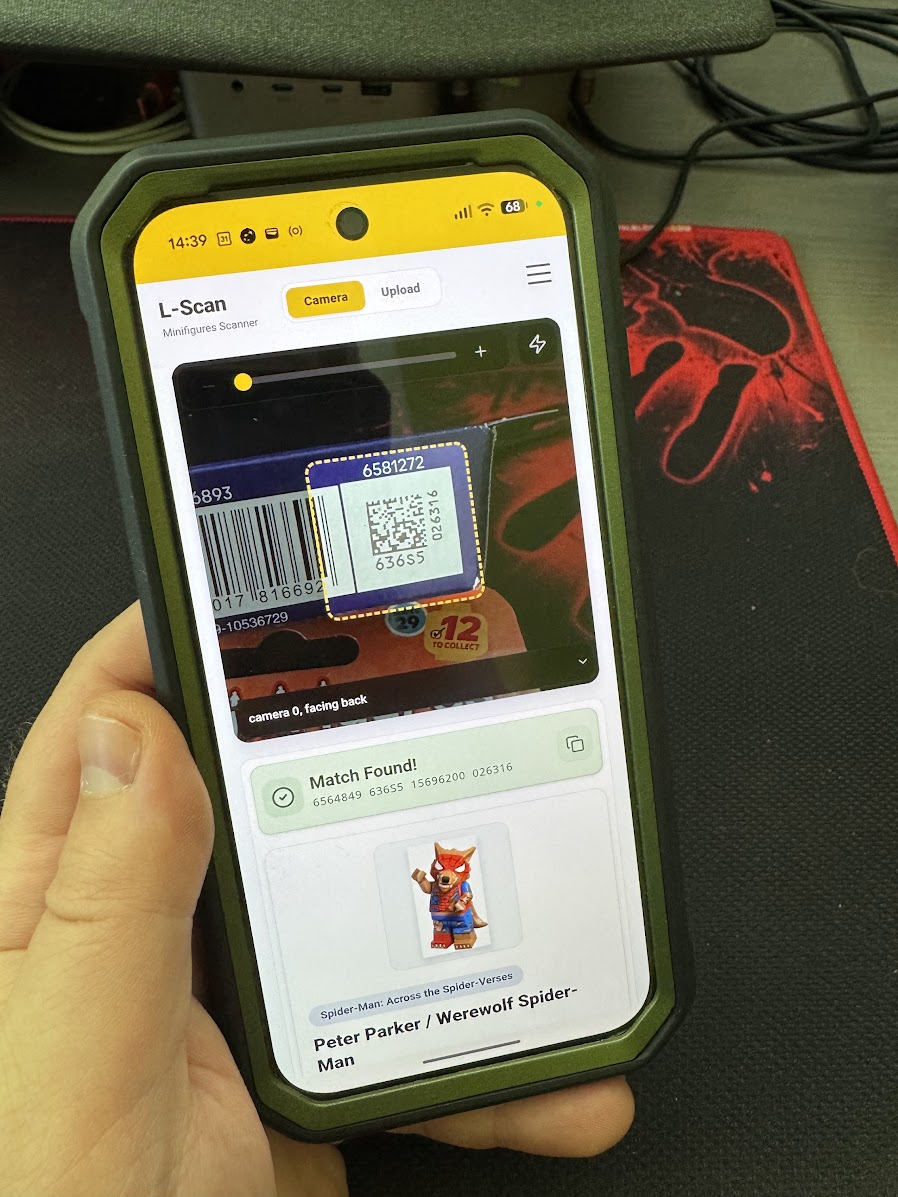
Today we will explore modern computer vision inside mobile browsers and check out my new app: L-Scan: Lego Minifigures Scanner.
If you belong to the global community of AFOLs (Adult Fans of Lego), you recently faced a monumental tragedy: the Cardboard Box Era. Lego replaced their traditional crinkly plastic blind bags with rigid cardboard boxes to promote ecological sustainability.
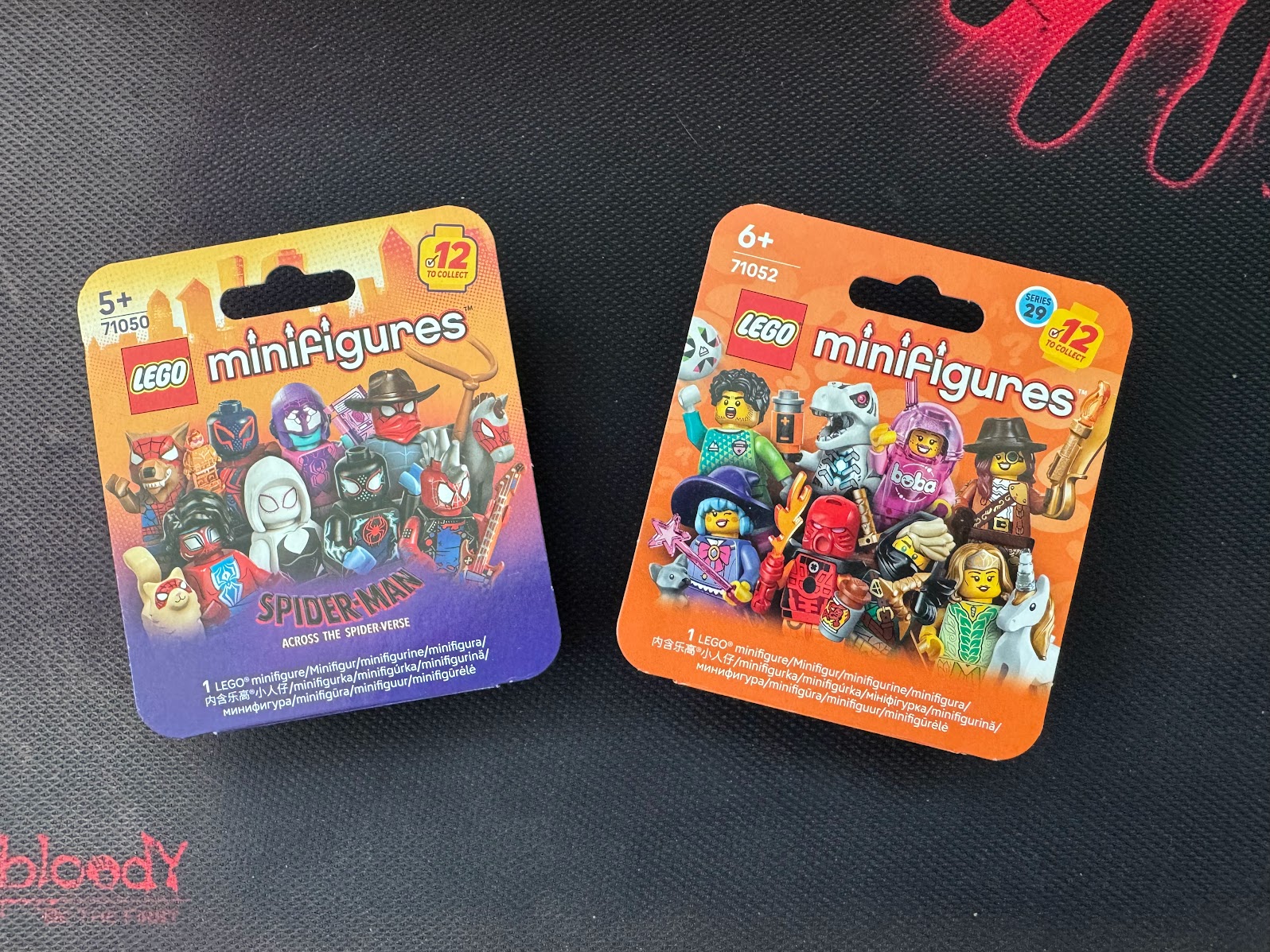
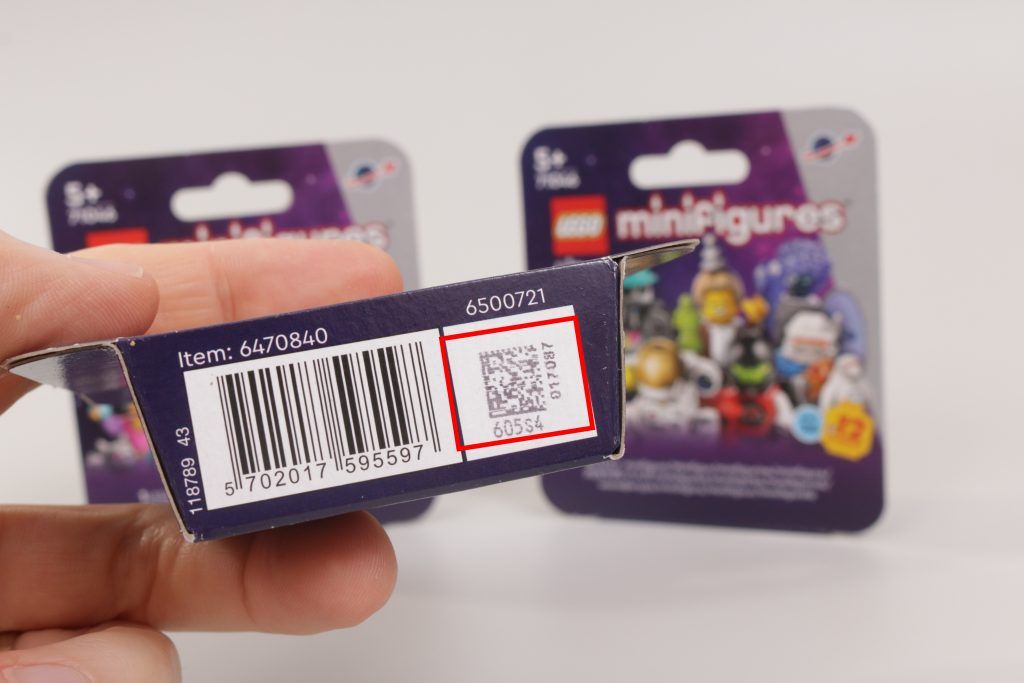
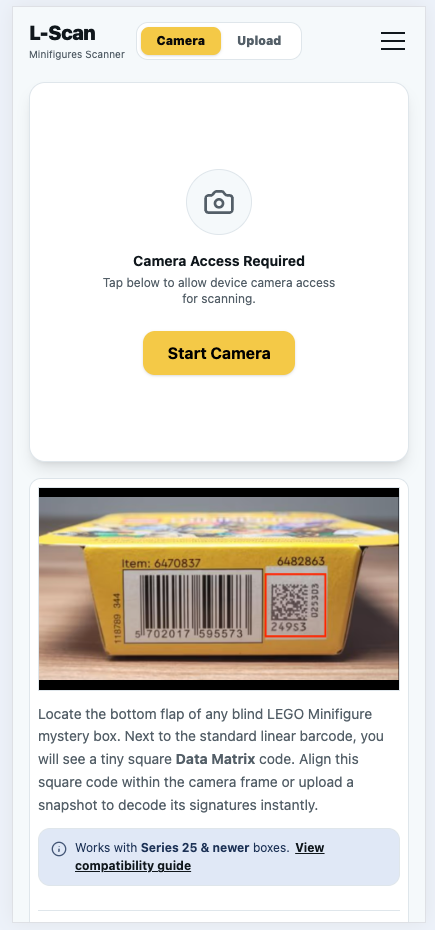
But when Lego closes a bag, they leave a backdoor open. On the bottom of these modern cardboard boxes sits a tiny, unassuming Data Matrix code. Encoded inside this tiny matrix is a factory-born serial string that uniquely maps to the exact minifigure hidden within.
Naturally, I built a web application to scan and decode them instantly. But this isn’t just another generic wrapper app. We are going to go full Master Builder mode today to dissect how L-Scan achieves real-time, 60fps frame processing directly inside a mobile web browser—completely offline, without a backend server, and without turning your smartphone into a pocket-sized space heater.
The Architectural Blueprint: Zero-Network Dependability
Imagine standing deep inside a windowless concrete superstore where cellular connections drop packets constantly. If a web application requires a round-trip network request to parse a code, it is already dead on arrival.
The application is engineered for absolute local permanence and relies on a modern front-end stack tailored for offline-first reliability:
- Svelte 5 & Runes: Powers a highly responsive, declarative user interface with minimal execution overhead. The reactive layer handles multi-device orientation changes and layout state machines cleanly using
$stateand$derivedscopes. - Service Workers: Caches all script bundles, stylesheets, custom themes, and image templates locally on the client’s device upon initial page visit.
- Dexie.js & IndexedDB: Initializes an embedded database runtime (
LegoScannerDB) inside the client sandbox, storing the full known catalog matrix indexes local to the phone.
flowchart TD
    subgraph Main["Main Thread"]
        direction LR
        UI["Svelte 5 UI"] <--> DB[("Dexie / IndexedDB")]
        DB <--> Cam["Camera Track"]
    end

    Sync["Sync Worker<br>(Background Updates)"]
    Scanner["Scanner Worker<br>(ZXing WASM & Canvas)"]

    UI -->|Comlink Communication| Sync
    Cam -->|Zero-Copy ImageBitmap| Scanner
To guarantee that the user interface never hitches or stutters while processing intense image streams, L-Scan divides computational tasks across independent execution contexts using standard browser Web Workers. A background synchronization daemon (sync-worker.js) updates database mappings silently, while a separate, specialized worker thread (scanner-worker.js) runs the active vision frame loops.
Camera Pipelines & Zero-Copy Threading
A frequent performance pitfall in browser-based image scanning involves pulling pixel matrices from a <video> element, transforming them into an array of raw integers, and passing them to a worker thread via a standard postMessage() execution. Doing this forces the underlying browser agent to create a deep duplicate of your frame data using the structured clone algorithm.
Copying a dense 1080p frame buffer 30 to 60 times every single second quickly chokes the CPU, sparking garbage collection (GC) pauses that drop rendering frame rates to single digits. L-Scan skips this entire performance tax by utilizing Transferable Objects and ImageBitmaps.
Inside our main rendering pipeline, live frames are extracted directly from the active hardware media stream track using an image capture sequence, generating a lightweight, hardware-backed graphics resource reference:
// Grab a fast, uncopied frame slice from the live video stream
const imageBitmap = await createImageBitmap(videoElement);

// Instantly shift absolute memory ownership to the Worker thread via Comlink
await workerAPI.detect(Comlink.transfer(imageBitmap, [imageBitmap]));
By adding imageBitmap directly to the postMessage transfer allocation list, the reference to the underlying pixel memory buffer is shifted to the worker thread without data duplication. The main thread instantly gives up its access right, dropping the message-passing cost to near zero.
WASM-Powered Computer Vision: Localizing ZXing
Parsing standard Data Matrix configurations is performed by ZXing (Zebra Crossing), an open-source library originally engineered in C++. Running complex matrix math directly in JavaScript would be too slow, which is why L-Scan integrates a compiled WebAssembly binary version of the decoder via zxing-wasm.
However, typical npm integrations of WASM modules pull their compiled binary extensions dynamically from global CDNs at runtime. If the phone is offline in the store, the application breaks because it cannot load the engine. To make it work completely offline, L-Scan packages the primary binary blob directly inside the static /public/wasm/ project directory and overrides the runtime localization procedures dynamically during module initialization:
import { prepareZXingModule, ZXING_WASM_VERSION } from "zxing-wasm/reader";

prepareZXingModule({
  overrides: {
    locateFile: (path, prefix) => {
      if (path.endsWith(".wasm")) {
        // Force local routing from our PWA static cache asset vault
        return `${cleanBase}/wasm/zxing/${ZXING_WASM_VERSION}/${path}`;
      }
      return `${prefix}${path}`;
    },
  },
  fireImmediately: true,
});
By intercepting the locateFile routine, the binary engine is extracted directly out of the local PWA application cache. The scanner core initializes instantly in absolute isolation without making a single outbound HTTP trip.
Morphological Pre-Processing
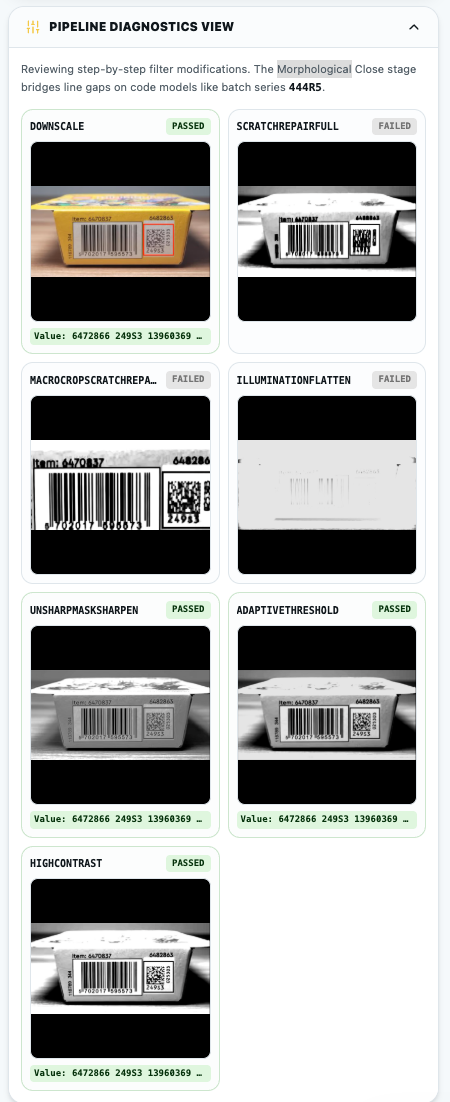
Here is the real-world engineering challenge: Lego’s high-speed packaging plants print these tiny data marks onto rough, fibrous cardboard surfaces. This frequently leads to minor ink dropouts, light print fade, or micro-scratches running through the target. To make things worse, phone cameras struggle to grab crisp macro-focus on tiny codes, and shoppers have shaky hands.
If you throw a blurry, faint, or slightly scratched box code directly at the decoder, the library fails to map the calibration borders and throws a decoding error.
To solve this, L-Scan directs all incoming frame assets through a 4-Phase Interleaved Frame Cycle loop inside scanner-worker.js:
// Loop the frame state from 0 to 3 continuously
liveFrameSequenceCounter = (liveFrameSequenceCounter + 1) % 4;
const framePhase = liveFrameSequenceCounter;- Phases 0 & 2 (Raw Paths): Passes the un-manipulated frame directly to the decoder. If the box code is crisp and perfectly illuminated, it decodes instantly with zero extra latency.
- Phase 1 (Full-Frame Line Repair): Runs a comprehensive morphological line reconstruction pass to stitch broken matrix squares back together.
- Phase 3 (Macro Center-Crop Zoom & Repair): Graphically crops the exact center 55% of the frame (executing a digital macro-zoom effect) and isolates it through morphological line repair to capture tiny or distant codes.
Let’s break down how this works without killing your smartphone’s battery life.
Squeezing the GPU via 2D Canvas Compositing Tricks
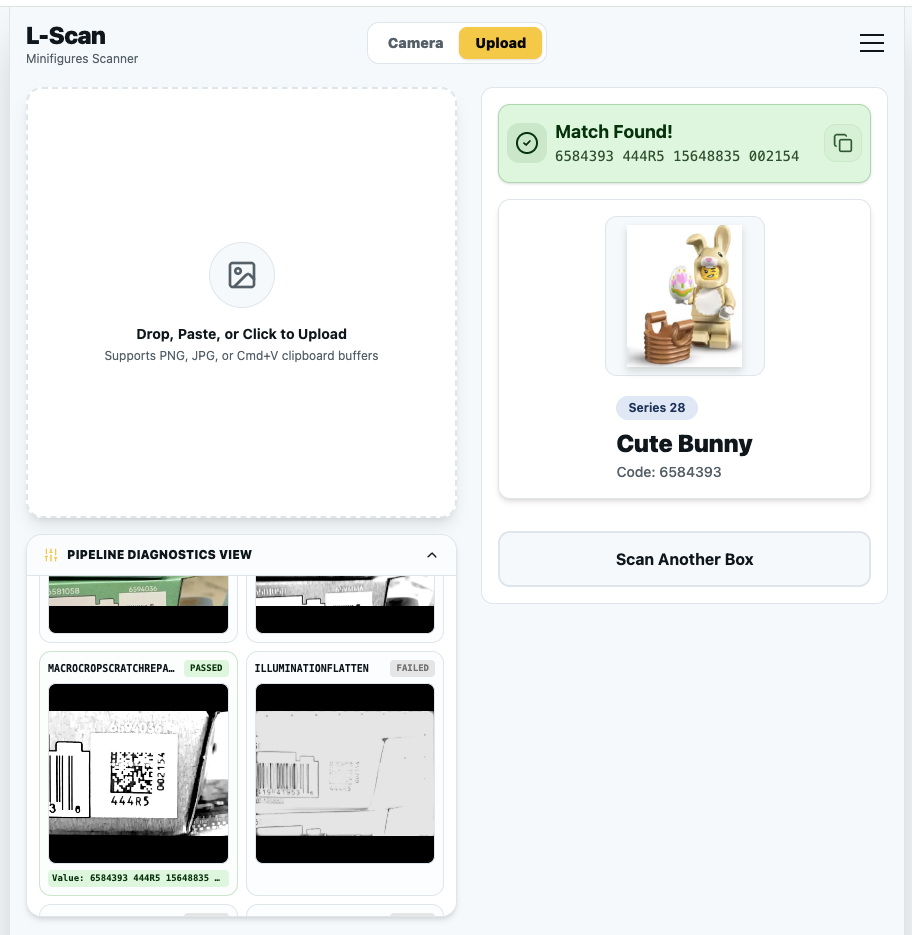
Standard morphological filters (dilation and erosion) require traversing multi-dimensional pixel arrays using nested coordinate loops in JavaScript. Executing these calculations manually across an image matrix within a 16ms frame window is impossible.
L-Scan bypasses this by utilizing hardware-accelerated 2D Canvas compositing tricks. Instead of inspecting individual pixel byte arrays, we draw the image multiple times over itself with slight geometric offsets, utilizing the device GPU’s native blending hardware via standard canvas globalCompositeOperation rules.
Here is how the worker’s imageScratchRepairFullProcessing pipeline executes this process:
Step A: High-Contrast Grayscale Isolation
First, the raw frame asset is downscaled and filtered to strip out distracting colors while magnifying the shadows left behind by the printed code:
basePool.ctx.filter = "grayscale(100%) contrast(170%) brightness(95%)";
basePool.ctx.drawImage(
  baseBmp,
  0,
  0,
  width,
  height,
  0,
  0,
  canvasWidth,
  canvasHeight,
);
const grayscaleSnapshot = await createImageBitmap(basePool.canvas);
Step B: The Dilation Pass (Bridge White Gaps)
Next, we run a dilation filter. By configuring our context operation to use darken and drawing our grayscale snapshot iteratively over a sequence of precise vertical pixel shifts ([-4, -3, -2, -1, 1, 2, 3, 4]), the dark boxes of the matrix bleed vertically into adjacent positions. This bridges print scratches or missing lines of ink instantly:
basePool.ctx.globalCompositeOperation = "darken";
for (const offset of MORPHOLOGICAL_HEALER_CLOSING_OFFSETS) {
  basePool.ctx.drawImage(grayscaleSnapshot, 0, offset);
}
const dilatedSnapshot = await createImageBitmap(basePool.canvas);
Step C: The Erosion Pass (Restore Proportions)
While our dilation step successfully seals the scratches, it also distorts the matrix code’s proportions by making all the black modules too tall. To balance this out, we shift our composite operation mode over to lighten and run the exact same spatial offsets array. This shrinks the bloated pixels back down to their original size while keeping the horizontal gaps we closed permanently filled.
basePool.ctx.globalCompositeOperation = "lighten";
for (const offset of MORPHOLOGICAL_HEALER_CLOSING_OFFSETS) {
  basePool.ctx.drawImage(dilatedSnapshot, 0, offset);
}
Step D: Final Profile Magnification
Lastly, we apply a heavy contrast surge (contrast(250%)) to sharpen the edges, producing a crisp, mathematically reconstructed image that the WASM decoder can read effortlessly.
Eliminating Garbage Collection Churn via Canvas Pools
Instantiating a new OffscreenCanvas element context for every single video frame would trigger severe memory issues. L-Scan prevents this overhead by implementing a persistent caching mechanism called canvasPool.
const canvasPool = {};

const getPooledCanvas = (key, width, height) => {
  if (!canvasPool[key]) {
    const canvas = new OffscreenCanvas(width, height);
    const ctx = canvas.getContext("2d");
    canvasPool[key] = { canvas, ctx };
  } else {
    const entry = canvasPool[key];
    if (entry.canvas.width !== width || entry.canvas.height !== height) {
      entry.canvas.width = width;
      entry.canvas.height = height;
    } else {
      entry.ctx.reset(); // Zero-allocation buffer reuse
    }
  }
  return canvasPool[key];
};
By calling entry.ctx.reset(), the internal canvas state and filter stacks are wiped clean while keeping the underlying memory allocation intact. This approach keeps memory consumption completely flat over extended scanning runs.
Offline-First Mechanics: The Two-Tier Cache & Intelligent Lazy-Loading
To stay completely independent from cellular networks, L-Scan implements a highly specialized, defensive routing proxy directly inside src/service-worker.js.
Instead of treating the cache as a giant, unstructured bucket of assets, the application divides network caching into a strict Two-Tier Cache Strategy Split:
// Two-Tier Cache Strategy Split
const STATIC_CACHE = `static-${version}`; // Rotates and wipes on version updates
const IMAGE_CACHE = `runtime-images-${IMAGE_CACHE_VERSION}`; // Persistent across updates to preserve user matching history
The Static Cache Layer (STATIC_CACHE)
This cache acts as the foundational baseplate for our application shell. It pre-caches all compilation artifacts (...build), local static pages (...prerendered), and utility layout configurations during the service worker’s install lifecycle event. When a new version of L-Scan is deployed, this folder automatically rotates, clearing out outdated components to ensure users run fresh code.
The Persistent Image Storage Vault (IMAGE_CACHE)
Minifigure imagery is high-resolution and heavy. If these images were stored alongside the application shell, every single update or hotfix to the app would wipe out the cache, forcing your phone to re-download megabytes of graphics on your next grocery store run.
By isolating image assets inside runtime-images-v1, this storage tier permanently survives core application version ticks. Your scanned minifigure history remains visually immediate, saving cellular data over time.
Lazy-Loading Images with a Cache-First Strategy
The service worker isolates minifigure graphics dynamically by tracking an asset regex against incoming requests:
const OPTIMIZED_ASSETS_REGEX =
  /_app\/immutable\/assets\/.+\.(webp|avif|png|jpg|jpeg)$/i;
When an optimized asset request is intercepted, L-Scan switches into an aggressive Cache-First execution loop.
Instead of pinging the network to check if an image has changed, it queries the local IMAGE_CACHE instantly. If a local file matches, it is piped straight to the screen. If it is a new minifigure series you haven’t browsed before, the request drops back to the cellular network, clones the successful response buffer, and lazily saves it to disk for your next offline venture:
// Persistent Image Assets Interceptor (Cache-First)
const isOptimizedImage = OPTIMIZED_ASSETS_REGEX.test(sanitizedPath);
if (isOptimizedImage) {
  const cachedImage = await imageCache.match(standardizedReq);
  if (cachedImage) return cachedImage; // no network overhead
}
Defensive API Timeouts: Bypassing “Lie-Fi”
One of the most frustrating aspects of mobile web development is “Lie-Fi”—where your phone displays full signal bars inside a steel-reinforced store, but data packets are silently black-holed. A standard browser fetch can hang for up to 90 seconds before declaring a timeout, leaving your screen spinning endlessly.
L-Scan mitigates this by implementing a fast-failing network wrapper around public data updates using a race condition pattern:
const API_TIMEOUT_MS = 3500;

const fetchWithTimeout = (request, timeoutMs) => {
  return Promise.race([
    fetch(request),
    new Promise((_, reject) =>
      setTimeout(
        () => reject(new Error("Network request timed out")),
        timeoutMs,
      ),
    ),
  ]);
};
When checking public collection data inside /api/, the service worker uses a Network-First with Fallback approach capped tightly at 3.5 seconds:
if (sanitizedPath.startsWith("/api/")) {
  try {
    const response = await fetchWithTimeout(event.request, API_TIMEOUT_MS);
    if (response.status === 200) {
      staticCache.put(standardizedReq, response.clone()); // Silently refresh local data
    }
    return response;
  } catch (err) {
    // Cell tower stalled? Instantly serve local cache fallback layer
    const cachedResponse = await staticCache.match(standardizedReq);
    if (cachedResponse) return cachedResponse;
    throw err;
  }
}
If the cellular network takes longer than 3.5 seconds to respond, the connection is aborted, and the service worker serves your locally stored dataset instead.
Keyspace Alignment via Request Normalization
The Cache Storage API matches requests strictly by string accuracy. If a browser appends a trailing slash (e.g., /howto/ instead of /howto) or appends a marketing query parameter, the cache treats it as a completely separate file, resulting in a cache miss.
To fix this, L-Scan normalizes incoming URLs directly within the worker proxy layer before running matches against the cache index:
const normalizeRequest = (request) => {
  const url = new URL(request.url);
  let pathname = url.pathname;

  // Defensively trim trailing slashes
  if (pathname.length > 1 && pathname.endsWith("/")) {
    pathname = pathname.slice(0, -1);
  }

  // Strip query strings to protect absolute path alignments
  if (url.search.length > 0 || url.pathname !== pathname) {
    return new Request(`${url.origin}${pathname}`, {
      method: request.method,
      headers: request.headers,
      mode: request.mode,
    });
  }
  return request;
};
This normalization step ensures that no matter how the browser structures the request, it resolves to the exact same locally cached asset.
Curated by Humans, Free for Everyone
A scanner application is only as powerful as the database driving it. Because Lego frequently rolls out new production batches with changing serial formats, keeping the catalog accurate requires real-world data coordination.
The dataset running L-Scan is completely crowdsourced and curated by passionate humans across the global Lego community. When a new series drops, collectors submit verified code mappings to ensure high accuracy.
Rather than locking this data behind a proprietary application wall, the entire database catalog is available as an open, public API endpoint structure for everyone.
If you are building your own custom inventory tracker, a native mobile application, or a Discord analytics bot, you can query these static JSON endpoints directly without registering an API key:
- Main Application Home: https://lego-scanner.leopard.in.ua/
- Public API Documentation: https://github.com/le0pard/lego-scanner/wiki/Public-API-Endpoints
For instance, pulling the entire catalog matrix for the Space-themed Series 26 is as simple as sending a standard GET request to:
https://lego-scanner.leopard.in.ua/api/collections/series-26.json
Summary
L-Scan demonstrates that modern mobile web browsers are capable of running intensive, low-latency machine vision workflows without calling external server backends. By offloading resource management to Web Workers, using WebAssembly for heavy algorithmic work, and relying on hardware-accelerated canvas compositing flags to heal images on the fly, we achieve an app-like experience directly on the web.
The full project is open source under the MIT License on GitHub. Feel free to explore the repository, submit a pull request, or adapt the morphological canvas filtering engine for your own computer vision projects!
Happy scanning, and may your next blind-box pull be exactly the minifigure you are looking for!